


braillekit_cli is a single executable with five modes. Every mode
writes to stdout by default and reads from stdin where it makes sense,
so the tool composes with Unix pipes.
Translate a single string
braillekit_cli "Hello World" en-ueb-g2
Optional arguments after the table ID: output format (unicode, brf,
ascii, dots, simbraille), and --capitals to emit capital
indicators.
Batch translation from stdin
echo "Hello" | braillekit_cli batch en-ueb-g2
Each input line becomes one output line. Use this for bulk work.
Convert between Braille formats
braillekit_cli convert input.brf dzb-brf ios-brf output.brf
No translation — just re-encoding. Supported formats on each side:
unicode, brf, dzb-brf, ios-brf, ascii, dots, simbraille.
Detect language and encoding
braillekit_cli detect "⠓⠁⠇⠇⠕"
Tells you what script and BRF dialect the input looks like.
eBraille import/export
# Create an eBraille book from text
braillekit_cli export-ebraille --title "My Book" --creator "Jane Doe" \
    --table en-ueb-g2 --input chapter.txt --output book.ebrl

# Inspect metadata
braillekit_cli ebraille-info book.ebrl

# Extract a single chapter
braillekit_cli ebraille-extract book.ebrl --chapter 3
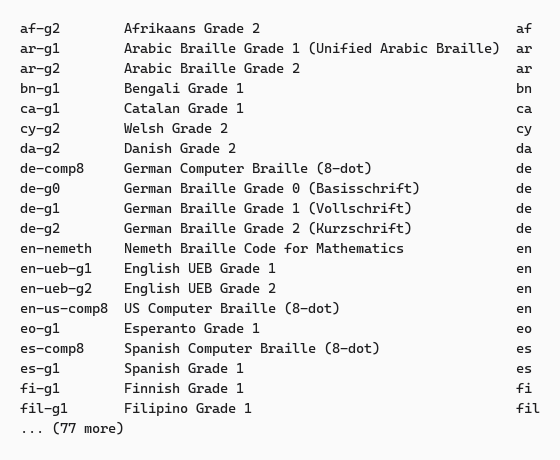
List available tables
braillekit_cli tables
Includes the stable/beta/alpha status per table.
Logging
Add -l logfile.txt to any command to capture a debug log; combine
with --log-level debug for maximum detail.
Next steps
- Output formats — reference for
unicode,brf,dzb-brf, etc. - Troubleshooting — common CLI pitfalls.